Friday, June 16, 2006
Shameless
As a devout follower of the Dizwell Principles, I gleefully added my google pagerank to the site after receving today's sermon.

Performancing
Ran across this blog editor while searching for flash-block. Performancing is a browser based editor for posting to your blog. The feature that I like is all your blogs are listed and you can choose which blog you post to without having to navigate blogger's menus. I'll give it a try and see how it works day-to-day (Not that I've been posting that much lately...)
Thursday, June 15, 2006
You believe this?
 Look at this crap. 99% of my CPU resources are being sucked up by Firefox because of the stupid IBM ad on this web page. I go off that page, and poof, it's down to 8% or less. Thanks IBM.
Tuesday, June 06, 2006
Compatibilities of tar
Arrgh. More Linux/Solaris incompatibilities. Seems as though the -I flag (include files listed in a file) on Linux is not supported. In fact, it gives you a nice error message "Warning: the -I option is not supported; perhaps you meant -j or -T?". Looks like I'll be twiddling with my .profile in the next couple of days...
Update: My boss pointed out -T works with Solaris and Linux. Doh.
Update: My boss pointed out -T works with Solaris and Linux. Doh.
Monday, June 05, 2006
Are we too connected?
This has been a hectic few weeks.
Along with moving, I have two major projects at work that have absolute drop dead dates within a week of each other. During the move last weekend, I was without my cable modem for 43 hours, 21 minutes.
Of course, the two major projects at work still had to get worked on, so I succumbed to working over dialup. And not just any dialup, NetZero freebie dialup. Now I don't have anything against NetZero dialup; it's a great free service if you remember to click on the ads every 15 minutes or so. It's just when you're used to using a cable modem, dialup is quite painful.
Over the four days I was off, I made three calls, was paged twice, and responded to about 24 emails. As the weekend was winding down, I thought to myself, Are we too connected? You can call me at home. You can call me on my cell phone. You can page/text message me. You can email me at work. You can email me at home. If I'm not at home I can be at a hot-spot in 15 minutes to "dial in".
Is anything that urgent?
Along with moving, I have two major projects at work that have absolute drop dead dates within a week of each other. During the move last weekend, I was without my cable modem for 43 hours, 21 minutes.
Of course, the two major projects at work still had to get worked on, so I succumbed to working over dialup. And not just any dialup, NetZero freebie dialup. Now I don't have anything against NetZero dialup; it's a great free service if you remember to click on the ads every 15 minutes or so. It's just when you're used to using a cable modem, dialup is quite painful.
Over the four days I was off, I made three calls, was paged twice, and responded to about 24 emails. As the weekend was winding down, I thought to myself, Are we too connected? You can call me at home. You can call me on my cell phone. You can page/text message me. You can email me at work. You can email me at home. If I'm not at home I can be at a hot-spot in 15 minutes to "dial in".
Is anything that urgent?
Thursday, June 01, 2006
Hang in there
Been really busy with stuff at work that I can't blog about, so things have been pretty sparse lately. Also, my home office is in a shambles since moving day and I don't even have my computers hooked up yet. I've been jotting down ideas, so stay tuned...
Monday, May 22, 2006
Metalink Update - I'm In
OK, here's the key. Don't do what the emails say, but login with your OLD username and password and you will be prompted to change your userid to your email. You will then get an email with your new username/password at which point you can logout/login and you will be prompted to change the password.
Metalink Update
Oracle support sends me a message saying my TAR has been updated and to go to http://metalink.oracle.com to see the update. Sigh.
Learned from the analyst that their analysts and engineers don't use Metalink, but have a Client/Server GUI that they use...
Learned from the analyst that their analysts and engineers don't use Metalink, but have a Client/Server GUI that they use...
Metalink Login
Oracle must have done a lot of testing of their Metalink conversion scheduled this past weekend, right? After all, I received no less than three emails outlining what was happening the weekend of May 19th. On Saturday, May 20th I decided to see if any work had been done on my TARs, so I decided to try and login. I tried several times and received a "page not found" every time so I decided they weren't done yet.
I went to metalink yesterday and the login page had changed, so I figured they were done, right? Tried logging in with my email and current password and received this lovely message:
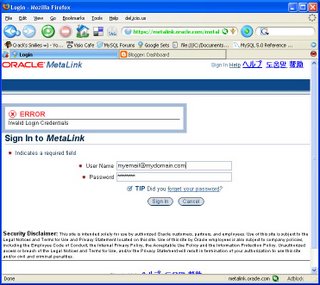
Tried again, same thing. So I figured maybe I should change my password. I clicked on the "forgot password" link and in a couple minutes I had a new password. Tried that password and still no luck.
Now it's Monday morning and I've tried the old password, new password, and I even got another new password. Now I'm trying to login and my browser is just waiting for metalink.oracle.com.
Maybe they forgot to apply pre-requisite patch 1456677 to patch 18277266 which is specified as a prerequisite for 88277266. I supposed they've already tried logging a TAR, but I guess metalink was down.
Welcome to the customer's view of Oracle.
Update
Called Oracle Support, had to wait 33 minutes until I got to talk to a human. "Yes, we know metalink is down. There is no ETA at this point."
I went to metalink yesterday and the login page had changed, so I figured they were done, right? Tried logging in with my email and current password and received this lovely message:
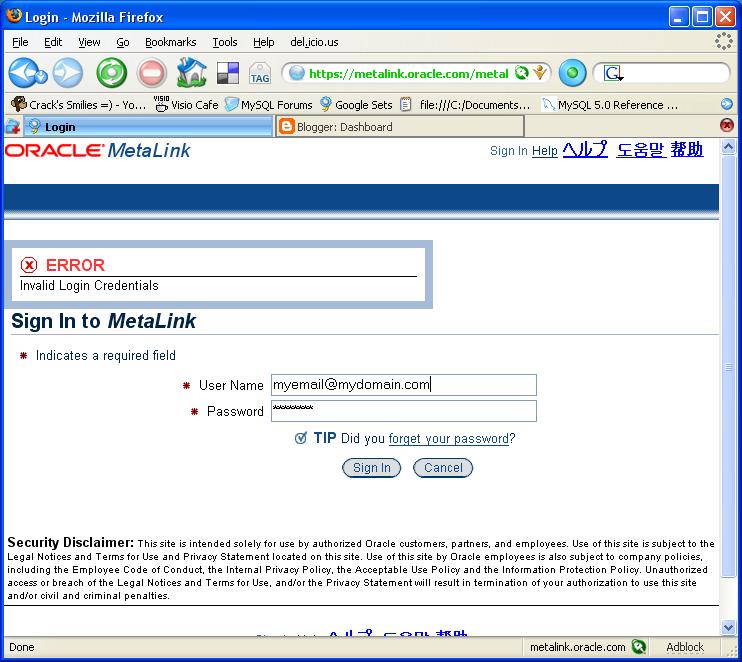
Tried again, same thing. So I figured maybe I should change my password. I clicked on the "forgot password" link and in a couple minutes I had a new password. Tried that password and still no luck.
Now it's Monday morning and I've tried the old password, new password, and I even got another new password. Now I'm trying to login and my browser is just waiting for metalink.oracle.com.

Maybe they forgot to apply pre-requisite patch 1456677 to patch 18277266 which is specified as a prerequisite for 88277266. I supposed they've already tried logging a TAR, but I guess metalink was down.
Welcome to the customer's view of Oracle.
Update
Called Oracle Support, had to wait 33 minutes until I got to talk to a human. "Yes, we know metalink is down. There is no ETA at this point."
Wednesday, May 17, 2006
Thunderbird Address Book #2
This address book thing is killing me. I tried Beth's suggestion and it deleted the entry for that session, but when I started Thunderbird again, there it was. I also took Ian's suggestion and deleted all the duplicate contacts to no avail. Arrrrgh. Investigating alternative email/RSS readers now...
Tuesday, May 16, 2006
Typical Greenwich
It was raining on my way to work this morning. Not a driving rain, but heavy enough that the wipers were on. I was stopped at a red light and directly across the intersection from me was a new black Bently.
To my right was an old couple waiting to cross the street. It would be a coin flip whether they were around for the first world war or not. He was in his London Fog jacket and a hat complete with old time galoshes. She looked like she just got off a fishing boat with a yellow slicker and buckle up rubber boots. Both used canes to shuffle along, and he held out his arm for her to hold as they stood waiting. The crossing signal turned to "WALK" and they started their journey across the street.
On this particular corner, the crossing signal counts down to indicate how many seconds you have left. When the signal read 10, they were just in front of my car.
"They're never going to make it", I thought to myself.
Time expired and they just cleared my lane.
My light turned green and I since I was turning left, I had to wait for the Bently to come through anyway. The Bently starts coming through the intersection and stops short when he sees the old couple crossing the street. Then he throws his hands up in disgust and BLOWS THE HORN at them.
The couple stops for a short second, the old man shoots the Bently driver a cold look, and they continue on their way. The Bently driver's mother must be proud.
To my right was an old couple waiting to cross the street. It would be a coin flip whether they were around for the first world war or not. He was in his London Fog jacket and a hat complete with old time galoshes. She looked like she just got off a fishing boat with a yellow slicker and buckle up rubber boots. Both used canes to shuffle along, and he held out his arm for her to hold as they stood waiting. The crossing signal turned to "WALK" and they started their journey across the street.
On this particular corner, the crossing signal counts down to indicate how many seconds you have left. When the signal read 10, they were just in front of my car.
"They're never going to make it", I thought to myself.
Time expired and they just cleared my lane.
My light turned green and I since I was turning left, I had to wait for the Bently to come through anyway. The Bently starts coming through the intersection and stops short when he sees the old couple crossing the street. Then he throws his hands up in disgust and BLOWS THE HORN at them.
The couple stops for a short second, the old man shoots the Bently driver a cold look, and they continue on their way. The Bently driver's mother must be proud.
Wednesday, May 10, 2006
Thunderbird Address Book
I'm getting a little ticked off at Thunderbird 1.5.0.2 lately. Don't get me wrong, I think it's a great email client and RSS reader. However, I've been running into a particularly annoying issue that has me on the brink of scrapping it.
You see, I just can't delete an entry from my "Personal Address Book". I know, I know, that's a pretty minor detail to be tossing a great email client. I'm a big fan of letting Thunderbird search your local address books for the person you want to address the message to. That's well and good when each person only sends you email from one address, but in the real world people have multiple email addresses.
My problem is my boss sent me an email from his home account a couple weeks ago. I replied no problem and everything was cool. The next time I sent him a message, Thunderbird automatically picked up his home email address and sent it there.
"OK", I thought to myself, "I'll just delete his home email and Tbird won't pick it up anymore."
So I deleted all occurrances from my address books, re-checked that it wasn't in there anymore, sent a test email, and he got it no problem. Shutdown Thunderbird and went home.
The next day I sent him an email again. Thunderbird picked his home email again. WTF? I know I deleted it, but sure enough, his home email was back. I tried deleting again, exiting Tbird and it showed up again. This was driving me crazy. After twiddling with it on and off for about 2 hours, I gave up and unchecked Tools>Options>Addressing>Address Autocompletion>Local Address Books.
Now when I address a message, I either have to know the person's email address or choose it from the address book. Maybe I'm just being impatient and this is one of those "doh" moments...
You see, I just can't delete an entry from my "Personal Address Book". I know, I know, that's a pretty minor detail to be tossing a great email client. I'm a big fan of letting Thunderbird search your local address books for the person you want to address the message to. That's well and good when each person only sends you email from one address, but in the real world people have multiple email addresses.
My problem is my boss sent me an email from his home account a couple weeks ago. I replied no problem and everything was cool. The next time I sent him a message, Thunderbird automatically picked up his home email address and sent it there.
"OK", I thought to myself, "I'll just delete his home email and Tbird won't pick it up anymore."
So I deleted all occurrances from my address books, re-checked that it wasn't in there anymore, sent a test email, and he got it no problem. Shutdown Thunderbird and went home.
The next day I sent him an email again. Thunderbird picked his home email again. WTF? I know I deleted it, but sure enough, his home email was back. I tried deleting again, exiting Tbird and it showed up again. This was driving me crazy. After twiddling with it on and off for about 2 hours, I gave up and unchecked Tools>Options>Addressing>Address Autocompletion>Local Address Books.
Now when I address a message, I either have to know the person's email address or choose it from the address book. Maybe I'm just being impatient and this is one of those "doh" moments...
Tuesday, May 02, 2006
Cost-Based Oracle Fundamentals
Been busy the last couple of weeks on the new house.
Even so, managed to get through my first pass of Cost-Based Oracle Fundamentals by Jonathan Lewis. I concentrated more on the concepts the author was trying to get across and less on the math of each operation. On the second go-round, I plan on doing the examples one by one and experimenting with some real-world data.
I didn't count, but I found myself saying "Ah-ha" several hundred times. Histograms, Ah-ha. Cardinality, Ah-ha.
There's a lot of hot air on the internet about Clustering Factor, but there is a whole chapter that sets you straight on the concept; both positives and negatives. The section on how reverse key indexes negatively can affect the Clustering Factor is really eye opening.
I personally got a lot out of Chapter 11, Nested Loops. Nested Loop joins are one of the more common access paths chosen and I thought I had a decent understanding of them. This chapter really filled in the gaps that were missing.
And a whole chapter on the 10053 event? Whoa. I'm sure there's a lot more to it, but now at least I have an idea of what's going on with the optimizer when I look at the trace file.
Lets just say the differences Jonathan points out between 9i and 10g scare me. Big time. A lot of differences are pointed out throughout the book, but there's going to be a ton of testing when 10g comes to town.
Cost-Based Oracle Fundamentals is definitely a recommended read.
Even so, managed to get through my first pass of Cost-Based Oracle Fundamentals by Jonathan Lewis. I concentrated more on the concepts the author was trying to get across and less on the math of each operation. On the second go-round, I plan on doing the examples one by one and experimenting with some real-world data.
I didn't count, but I found myself saying "Ah-ha" several hundred times. Histograms, Ah-ha. Cardinality, Ah-ha.
There's a lot of hot air on the internet about Clustering Factor, but there is a whole chapter that sets you straight on the concept; both positives and negatives. The section on how reverse key indexes negatively can affect the Clustering Factor is really eye opening.
I personally got a lot out of Chapter 11, Nested Loops. Nested Loop joins are one of the more common access paths chosen and I thought I had a decent understanding of them. This chapter really filled in the gaps that were missing.
And a whole chapter on the 10053 event? Whoa. I'm sure there's a lot more to it, but now at least I have an idea of what's going on with the optimizer when I look at the trace file.
Lets just say the differences Jonathan points out between 9i and 10g scare me. Big time. A lot of differences are pointed out throughout the book, but there's going to be a ton of testing when 10g comes to town.
Cost-Based Oracle Fundamentals is definitely a recommended read.
Wednesday, April 19, 2006
Monday, April 17, 2006
Year Six
Disclaimer:
I have the unfortunate luck of being hired on the same date that Tom Kyte started his blog. Honestly, I've been working on this a couple days so I'm posting it anyway, even if you think I am a copycat.
Six years ago today I started with my current company. This is the longest I've ever had the same title, although my responsibilities have changed over the years. It's also the most time I've spent at the same place.
It was the tail end of the dotCom boom and I had over 40 interviews with companies in the Tri-State area. Most of them didn't pan out, but when it came time to choose, I had three offers to consider. When I accepted this job, I took a chance because I liked the people but didn't think they had enough for me to do. I was the sole DBA for one production database that ran on an Ultra 2 (2 CPUs, 54G of disk, 512M). The telecom company I came from had three E5500's (six CPUs, 2G RAM, 600G disk). In fact, they had more than enough for me to do.
My first project at the new company was to move approximately half of the schemas in the production db to a new server. By the end of the first year, I was managing four db servers. Today, my team of three manages about a dozen db servers and almost two dozen instances. We've gone from a little six-pack of disks to a 3+TB SAN.
My second project was to setup a backup & recovery plan. Good thing, too, because about 6 months later we did a full recovery of one of our major production systems. Fortunately, we only had 3 un-planned recoveries until the blackout in August 2003. Recovered 12 databases that night.
Now MySQL and Linux are at the forefront of of my knowlege adventure. Maybe six years from now our MySQL databases will outnumber the Oracle ones...
I have the unfortunate luck of being hired on the same date that Tom Kyte started his blog. Honestly, I've been working on this a couple days so I'm posting it anyway, even if you think I am a copycat.
Six years ago today I started with my current company. This is the longest I've ever had the same title, although my responsibilities have changed over the years. It's also the most time I've spent at the same place.
It was the tail end of the dotCom boom and I had over 40 interviews with companies in the Tri-State area. Most of them didn't pan out, but when it came time to choose, I had three offers to consider. When I accepted this job, I took a chance because I liked the people but didn't think they had enough for me to do. I was the sole DBA for one production database that ran on an Ultra 2 (2 CPUs, 54G of disk, 512M). The telecom company I came from had three E5500's (six CPUs, 2G RAM, 600G disk). In fact, they had more than enough for me to do.
My first project at the new company was to move approximately half of the schemas in the production db to a new server. By the end of the first year, I was managing four db servers. Today, my team of three manages about a dozen db servers and almost two dozen instances. We've gone from a little six-pack of disks to a 3+TB SAN.
My second project was to setup a backup & recovery plan. Good thing, too, because about 6 months later we did a full recovery of one of our major production systems. Fortunately, we only had 3 un-planned recoveries until the blackout in August 2003. Recovered 12 databases that night.
Now MySQL and Linux are at the forefront of of my knowlege adventure. Maybe six years from now our MySQL databases will outnumber the Oracle ones...
Saturday, April 15, 2006
Using vacation
I try to be a good corporate citizen. When I'm out of the office I use the vacation program to automatically reply and let people know I'm out of the office. Somehow, I think the 9.2.0.7 patchset has figured out how to look at the DBA's .forward file and know when to have problems. No matter what you think of me, I don't relish the idea of recovering a 600G database using Juno free dialup from Aunt Sally's house.
Tuesday, April 11, 2006
Using MySQL's LOAD DATA LOCAL
We're starting on a new project using MySQL that will bulk load CSV data once a day and then users can report on it whenever they want. In the days of old (ie. Oracle), we'd simply setup a load job using SQL*Loader or use external tables. In MySQL, loading data is just an extension of SQL using the LOAD DATA command. Since my data was going to be distributed, I wanted
to explore Mike Hillyer's suggestion of using the LOCAL option of LOAD DATA.First, I created a small table called “testload” :
to explore Mike Hillyer's suggestion of using the LOCAL option of LOAD DATA.First, I created a small table called “testload” :
mysql> create table testload (empid integer, name varchar(20),
bonus integer);
Query OK, 0 rows affected (0.02 sec)
I then decided to try it from the server to verify everything worked as expected:
mysql> -u root -p
Enter password:
Welcome to the MySQL monitor.  Commands end with ; or \g.
Your MySQL connection id is 8 to server version: 5.0.18

Type 'help;' or '\h' for help. Type '\c' to clear the buffer.

mysql> use user1
Reading table information for completion of table and column names
You can turn off this feature to get a quicker startup with -A

Database changed

mysql> load data infile '/home/users/jeff/foo.txt' into table
testload fields terminated by '|';
Query OK, 6 rows affected (0.00 sec)
Records: 6  Deleted: 0  Skipped: 0  Warnings: 0

mysql> select * from testload;
+------+-------+------+
| id   | name  |bonus |
+------+-------+------+
|    1 | jeff  |   30 |
|    2 | user1 |   20 |
|    3 | gail  |   60 |
|    4 | bob   |   40 |
|    5 | john  |   70 |
|    6 | jim   |  100 |
+------+-------+------+
6 rows in set (0.00 sec)

mysql> delete from testload;
Query OK, 6 rows affected (0.00 sec)
Now I know it works as the root user. Lets try as somebody else on the server. First, I check to make sure I have FILE privilege:
mysql> select host, user, password, file_priv from user
> where user = 'user1';
+------+-------+-------------------------------------------+-----------+
| host | user  | password                                  | file_priv |
+------+-------+-------------------------------------------+-----------+
| %    | user1 | *2309AA61C73F02E54890747EAD6FFCB927A66565 | Y         |
+------+-------+-------------------------------------------+-----------+
1 row in set (0.00 sec)

mysql@sql1 $ mysql -u user1 -h sql1 -P3322 -p user1
Enter password:
ERROR 1045 (28000): Access denied for user 'user1'@'sql1' (using
password: YES)
Hmmm, I don't really get this one since I should be covered by the '%'. Have to investigate that later, but lets grant permission on this host anyway.
mysql@sql1 $ mysql -u root -p
Enter password:
Welcome to the MySQL monitor. Commands end with ; or \g.
Your MySQL connection id is 12 to server version: 5.0.18

Type 'help;' or '\h' for help. Type '\c' to clear the buffer.

mysql> grant file on *.* to 'user1'@'sql1' identified by 'nopassword';
Query OK, 0 rows affected (0.00 sec)
Let's check the privs and try again from the same user:
mysql@sql1 $ mysql -u user1 -h sql1 -P3322 -p user1
Enter password:
Reading table information for completion of table and column names
You can turn off this feature to get a quicker startup with -A


Welcome to the MySQL monitor. Commands end with ; or \g.
Your MySQL connection id is 14 to server version: 5.0.18


Type 'help;' or '\h' for help. Type '\c' to clear the buffer.


mysql> select host, user, password, file_priv from user
> where user = 'user1';
+------+-------+-------------------------------------------+-----------+
| host | user  | password                                  | file_priv |
+------+-------+-------------------------------------------+-----------+
| %    | user1 | *2309AA61C73F02E54890747EAD6FFCB927A66565 | Y         |
| sql1 | user1 | *2309AA61C73F02E54890747EAD6FFCB927A66565 | Y         |
+------+-------+-------------------------------------------+-----------+
2 rows in set (0.00 sec)
Now that I have given myself privileges on the server, it should
work, right?
mysql> load data infile '/home/users/jeff/foo.txt' into table
testload fields terminated by '|';
Query OK, 6 rows affected (0.02 sec)
Records: 6 Deleted: 0 Skipped: 0 Warnings: 0


mysql> select * from testload;
+------+-------+------+
| id   | name  |bonus |
+------+-------+------+
| 1    | jeff  |  30  |
| 2    | user1 |  20  |
| 3    | gail  |  60  |
| 4    | bob   |  40  |
| 5    | john  |  70  |
| 6    | jim   | 100  |
+------+-------+------+
6 rows in set (0.00 sec)
Sure enough, that did the trick. On to loading from a client:
host1:/home/users/user1/tmp $ mysql -u user1 -h sql1 -P3321 -p user1
Enter password:
Reading table information for completion of table and column names
You can turn off this feature to get a quicker startup with -A


Welcome to the MySQL monitor. Commands end with ; or \g.
Your MySQL connection id is 22 to server version: 5.0.18


Type 'help;' or '\h' for help. Type '\c' to clear the buffer.


mysql> load data local infile '/home/users/jeff/foo.txt' into
table testload fields terminated by '|';
ERROR 1148 (42000): The used command is not allowed with this MySQL version
mysql> quit
Now what? I go back to the documentation and re-read about the
parameter local_infile. I'm pretty sure I set it, but lets check
anyway:
mysql> show variables like 'local%';
+---------------+-------+
| Variable_name | Value |
+---------------+-------+
| local_infile  | ON    |
+---------------+-------+
1 row in set (0.00 sec)
That's what I thought. I went over the docs once again and saw a
mention of the local-infile argument to the mysql client. So I tried
that:
host1:/home/users/user1/tmp $ mysql -u user1 -h sql1 -P3321 -p
user1 --local-infile -p user1

Enter password:
Reading table information for completion of table and column names
You can turn off this feature to get a quicker startup with -A


Welcome to the MySQL monitor. Commands end with ; or \g.
Your MySQL connection id is 23 to server version: 5.0.18


Type 'help;' or '\h' for help. Type '\c' to clear the buffer.


mysql> load data local infile '/home/users/jeff/foo.txt' into
table testload fields terminated by '|';
Query OK, 6 rows affected (0.02 sec)
Records: 6 Deleted: 0 Skipped: 0 Warnings: 0
Nice. That is exactly what I am looking for. Knowing that you can set
preferences in your .my.cnf file, I setup the local-infile option in
my .my.cnf.
host1:/home/users/user1 $ more .my.cnf
[client]
loose-local-infile=1
As long as I'm at it, why not setup the host, port, and user in my
.my.cnf.
[client]
loose-local-infile=1
host=sql1
port=3321
user=user1
Then, it's a simple command to login.
user1@host1 13> mysql -p user1
Enter password:
Reading table information for completion of table and column names
You can turn off this feature to get a quicker startup with -A

Welcome to the MySQL monitor. Commands end with ; or \g.
Your MySQL connection id is 28 to server version: 5.0.18

Type 'help;' or '\h' for help. Type '\c' to clear the buffer.

mysql>
I learned a lot about LOAD DATA during this exercise.
- The local_infile parameter must be set to 1 in the my.cnf
file on the server. - By default, the mysql client doesn't allow you to load data from the client. You must use the local-client flag or set the loose-local-client flag in your .my.cnf file.
- You must have the FILE privilege.
Tuesday, April 04, 2006
Using Resource Profiles
I never had the need to use Resource Profiles extensively. Recently, though, I've had the opportunity to investigate this feature.
First things first, the resouce_limit parameter must be set to TRUE. You can either set it in the init.ora or via ALTER SYSTEM.
Next, you create the profile and assign limits to it. Read the descriptions carefully, though, some of the resource parameters may sound self-explanatory, but aren't. For example, you would think SESSIONS_PER_USER would mean the number of times a particular user can login. In fact, it's the number of concurrent sessions that can run at one time.
Then you assign the profile to a particular user:
Just for kicks, you can check that your profile is assigned to your user.
Your user connects to the database, starts running his monster query, and is promptly disconnected:
Sweet.
First things first, the resouce_limit parameter must be set to TRUE. You can either set it in the init.ora or via ALTER SYSTEM.
Next, you create the profile and assign limits to it. Read the descriptions carefully, though, some of the resource parameters may sound self-explanatory, but aren't. For example, you would think SESSIONS_PER_USER would mean the number of times a particular user can login. In fact, it's the number of concurrent sessions that can run at one time.
SQL> create profile really_small limit
2  sessions_per_user 1
3  cpu_per_session   100
4  cpu_per_call      100
5  connect_time       5
6  /

Profile created.
Then you assign the profile to a particular user:
SQL> alter user jh profile really_small;

User altered.
Just for kicks, you can check that your profile is assigned to your user.
SQL> select username, profile from dba_users where username = 'JH';

USERNAME     PROFILE
------------ ---------------
JH           REALLY_SMALL

SQL> select resource_name, resource_type, limit
2  from dba_profiles
3  where profile = 'REALLY_SMALL';

RESOURCE_NAME                    RESOURCE LIMIT
-------------------------------- -------- ------------------
COMPOSITE_LIMIT                  KERNEL   DEFAULT
SESSIONS_PER_USER                KERNEL   1
CPU_PER_SESSION                  KERNEL   100
CPU_PER_CALL                     KERNEL   100
LOGICAL_READS_PER_SESSION        KERNEL   DEFAULT
LOGICAL_READS_PER_CALL           KERNEL   DEFAULT
IDLE_TIME                        KERNEL   DEFAULT
CONNECT_TIME                     KERNEL   5
PRIVATE_SGA                      KERNEL   DEFAULT
FAILED_LOGIN_ATTEMPTS            PASSWORD DEFAULT
PASSWORD_LIFE_TIME               PASSWORD DEFAULT
PASSWORD_REUSE_TIME              PASSWORD DEFAULT
PASSWORD_REUSE_MAX               PASSWORD DEFAULT
PASSWORD_VERIFY_FUNCTION         PASSWORD DEFAULT
PASSWORD_LOCK_TIME               PASSWORD DEFAULT
PASSWORD_GRACE_TIME              PASSWORD DEFAULT

16 rows selected.
Your user connects to the database, starts running his monster query, and is promptly disconnected:
$ sqlplus jh/jh@mydb

SQL*Plus: Release 10.2.0.2.0 - Production on Tue Apr 4 20:34:23 2006

Copyright (c) 1982, 2005, Oracle.  All Rights Reserved.


Connected to:
Oracle9i Enterprise Edition Release 9.2.0.5.0 - Production
With the Partitioning option
JServer Release 9.2.0.5.0 - Production

SQL> select count(*) from all_objects, all_objects, all_objects;
select count(*) from all_objects, all_objects, all_objects
                 *
ERROR at line 1:
ORA-02392: exceeded session limit on CPU usage, you are being logged off
Sweet.
Subscribe to:
Posts (Atom)